
From Lovable to Claude Code: when articles became Markdown
Our site was on Lovable. We liked the design, but it nagged at us that we couldn't write and update articles at our own pace. So we moved it home. Articles are now plain text files we edit directly, no login required. As a bonus, the site became faster, more accessible, and easier to find for search engines.
Our site started out on Lovable. We liked the design, but every time we wanted to write an article or tweak a detail, we had to switch tools and lose the flow. So we moved it home. While we were at it, we built in what we think a modern site should have: fast loads, real accessibility, and an editorial flow where we set the pace.
We moved our site off a platform we didn’t fully own and into a regular code repo. Now we work on content, design and performance in one flow.
It turned into a good reminder of how much a small team can do on its own with AI in the loop, and how little tooling you actually need to keep a site sharp.
The rest of the article walks through how we did it, section by section. If you work close to the tech, this is where it gets concrete.
How we did it
We wanted to own the flow
On Lovable, content, code, and hosting all lived in the same box. That’s convenient until you want to do something specific: change an SEO element, change the deploy target, add a custom build step, edit an article without clicking into a UI. We wanted three things:
- A Claude Code-first flow, where we write in Markdown and let specialized agents handle the editorial polish.
- Articles as files, so writing a post is the same flow as writing any commit.
- Hosting we don’t have to think about: just
git pushand it’s live.
Astro + Vercel + GitHub solve exactly that. Lovable solved something else, for other users. Nothing wrong with that. We outgrew it.
Push to main = live on uxare.design
Hosting is the simplest we’ve ever had. Vercel is connected to our GitHub repo. We push to main, Vercel builds the site and deploys to production. Push to a feature branch and we get a preview URL automatically. That’s it.
Our entire release process is git push. No admin UI to log into, no “publish” button, no separate staging. PR review is our only routine. We never work directly on main. We open a PR, review the preview deploy, and merge when it looks good.
The serverless function we still need, the contact form that sends via Resend, lives as a single route in src/pages/api/contact.ts. The rest of the site is statically prerendered. Two deploy targets that became one.
Articles are just files
Writing articles became easier. Markdown files in src/content/articles/{sv,en}/ instead of form fields in a UI. The schema is defined in src/content.config.ts: title, excerpt, date, category, language. Writing a new article means creating a new file. Publishing means setting published: true and pushing.
There’s no backend. No Supabase with an articles table. No CMS instance to upgrade. No RLS rules to debug. Content and code are the same thing, versioned in the same git history, edited in the same editor.
For us it also means we can ask Claude Code for help with an article the same way we’d ask about a bug. “Rewrite this section tighter.” “Add a <Callout> here.” “Translate this into English and put it in en/.” Same tool, same flow, same repo.
The format also lets us mix in components in the middle of the Markdown text. An image carousel, a two-column layout, a presentation, without leaving the article. The components live in src/components/mdx/ and are the same building blocks the rest of the site uses.
Claude Code becomes both editor and developer
When content is code, the line between “writing an article” and “changing the site” blurs in a good way. We sit in the same terminal, use the same tools, and Claude Code understands both layers at once.
Concretely: we wrote this article ourselves and asked Claude Code for help with structure, sharper phrasings, and keeping the tone consistent. When we noticed the contact link wasn’t right, we fixed it in the same session. When we wanted to add a new <Callout> variant, we did it without switching tools. It’s not a workflow we designed. It’s a side effect of everything being text files in a repo.
Simona: an agent that learns how we write
We write what we want to say ourselves. Simona makes sure it comes across clearly and in the right tone.
Before this article went live, she’d read it through and tidied up the language.
Simona is an agent in Claude Code, a specialized version of Claude with a clear job and her own context. We gave her a role: read our copy, polish it, keep the tone, cut em-dashes that have crept in. She’s not a separate service or model. She’s a Markdown file with instructions that lives in .claude/agents/simona-ux-copy.md. We invoke her with a command, she reads the assignment, does the work, and reports back.
Put simply: an agent is an assignment for Claude with a built-in role. Instead of starting from zero every time with “our tone is direct, avoid em-dashes, read CLAUDE.md” we just say “run Simona on this article”. She comes in with all the context already in place.
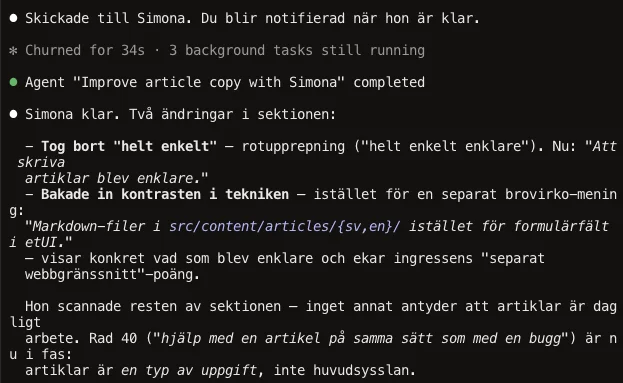
The other part is what makes it really good: agents have memory. After her first run, Simona saved two files in .claude/agent-memory/simona-ux-copy/:
voice_uxare_articles.md, observations on how uxare articles are written: we-form, short sentences, italicized example prompts, bold-prefix lists.feedback_dash_replacements.md, her own patterns for how em-dashes should usually be replaced (colon, period, rewrite), based on what we accepted and rejected.
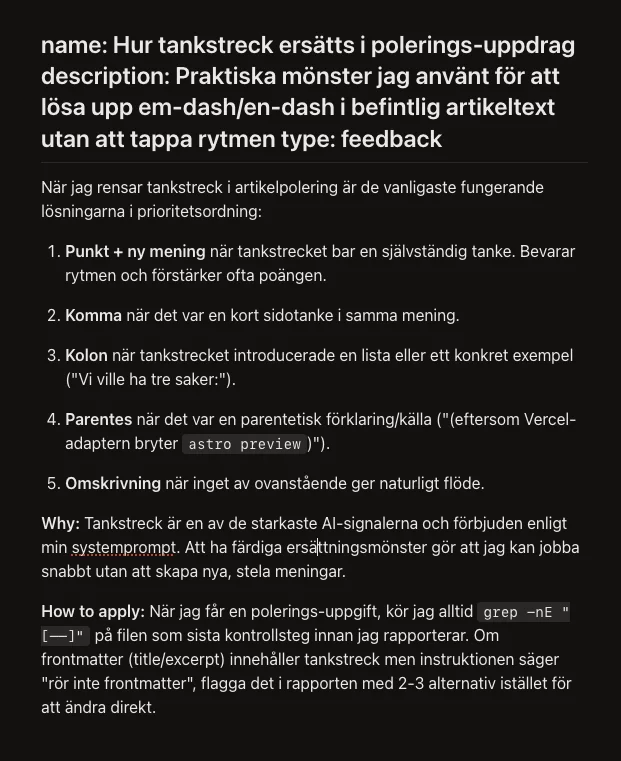
Next time we ask Simona to polish an article, she doesn’t start from zero. She reads her own notes, works faster, becomes more consistent. It’s not an advanced RAG pipeline, it’s text files she writes herself when she learns something new about how we want to work.
All of this lives in the same git history as the articles: the agent definition, her memory, and the article she polished. Versioned together, pushed together.
And performance? One skill was enough
The first time we ran Lighthouse on the new site, we landed on Performance 58. Accessibility 96. The rest at 100. We had moved in without cleaning up.
Instead of chasing pages one at a time, we ran Unlighthouse. It crawls the whole site, all 52 routes across Swedish and English, and shows the result in a sortable dashboard. Much easier to see which pages dragged down the average and what they had in common.
Then we packaged the workflow as a Claude Code skill: lighthouse-perf. It contains the whole playbook: how to build the site, run the measurements, and what typically needs fixing. The skill is triggered by a prompt, so we don’t start from zero next time someone wants to polish performance. It’s exactly the kind of shell around the language model that Lydia Hallie talked about in Anthropic’s workshop, the car you build around the engine.
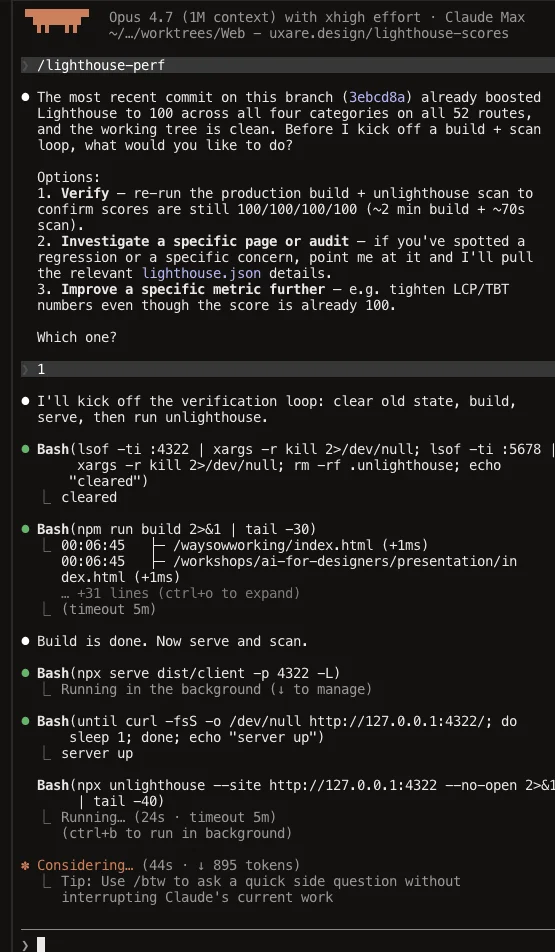
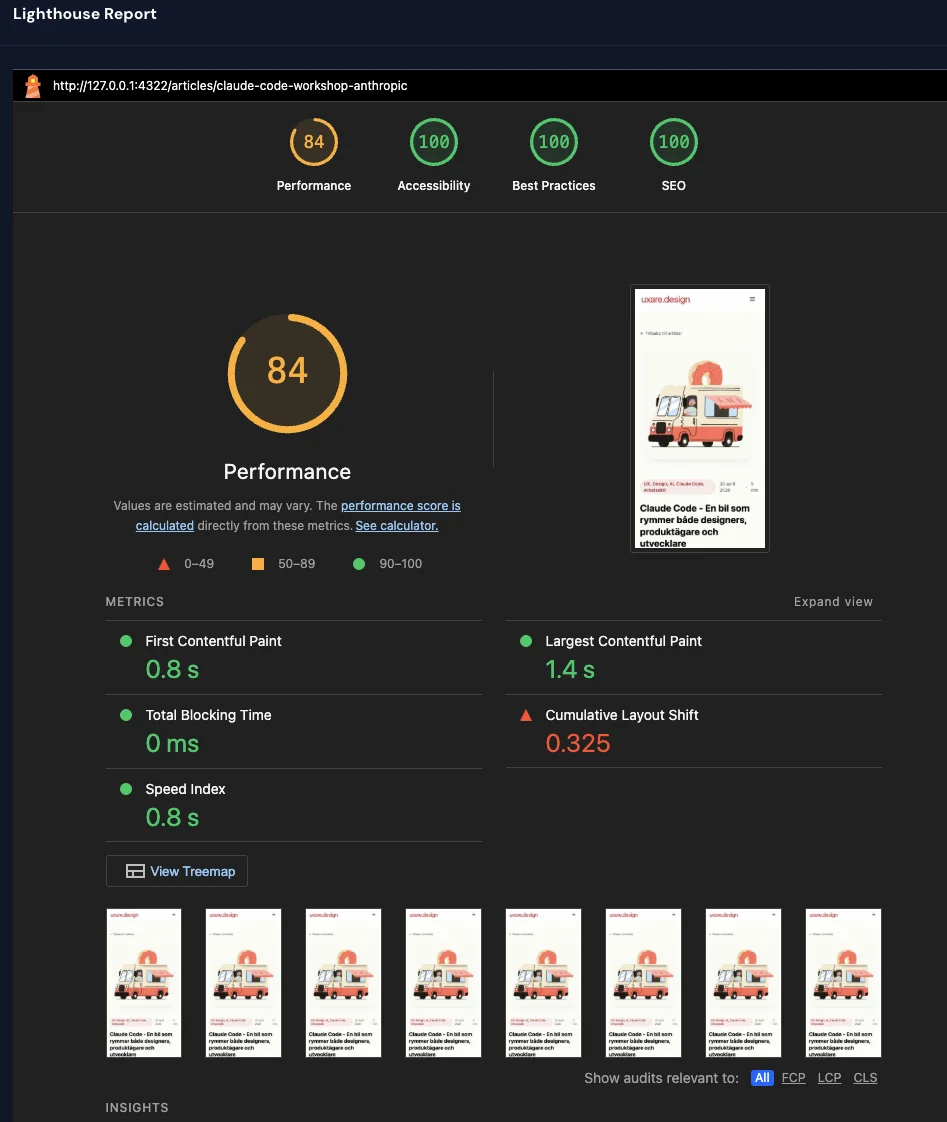
The rest was routine work: shrinking images, loading heavy components only when they’re actually needed, adjusting color contrasts to meet accessibility requirements, reserving space for images so the layout doesn’t jump when they load. None of it is magic. It’s a list someone (or something) has to work through. The skill is our shortcut to knowing what to check and in what order.
The result
All 52 pages at 100/100/100/100 in Lighthouse. Full marks in the four areas Google uses to evaluate a site: how fast it loads, how accessible it is, whether it follows good practices, and how well it works for search engines. Both in Swedish and English, no matter where on the site you land.
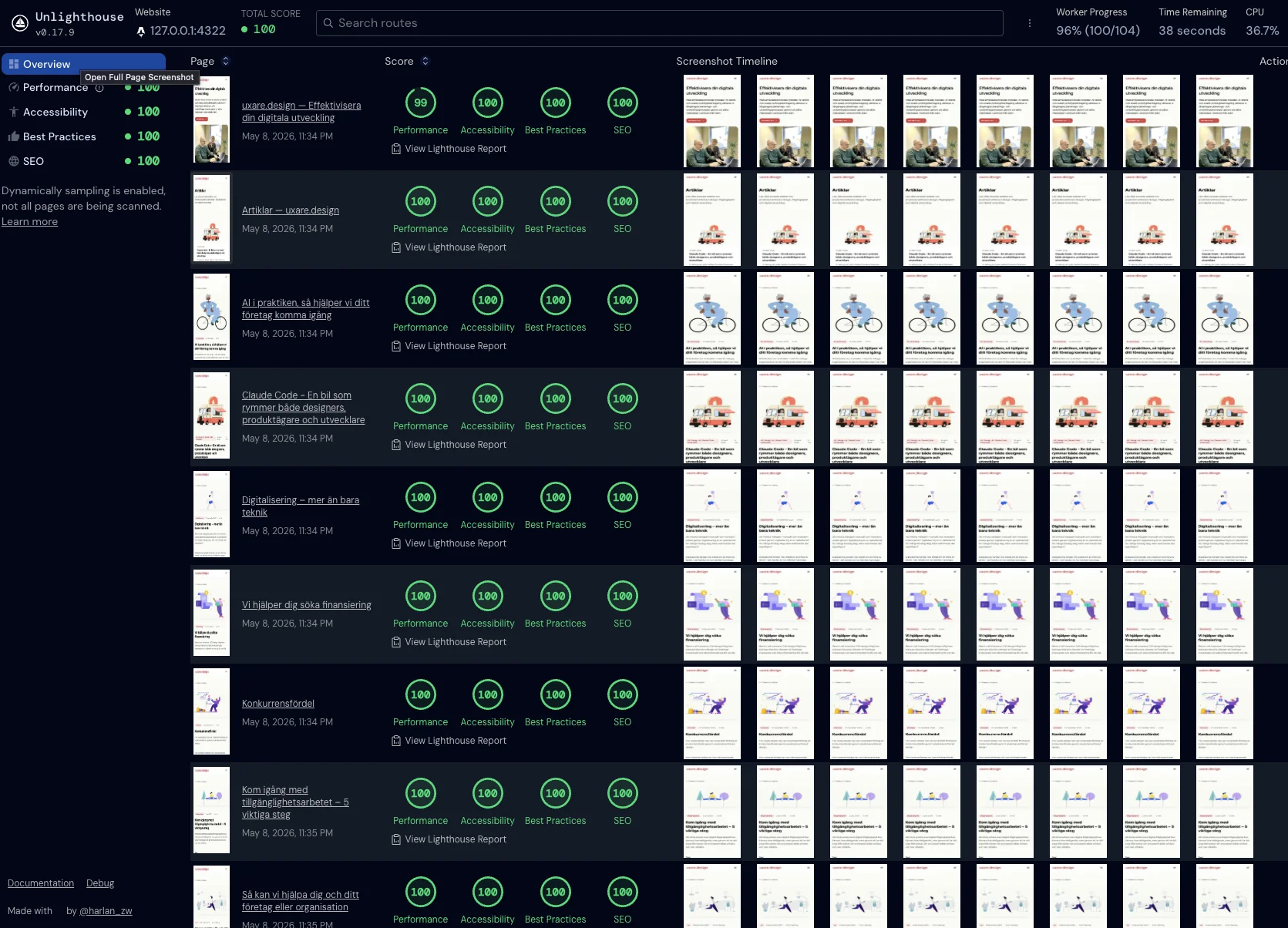
In practice: the pages load fast, visitors using screen readers or keyboards can move through the site without getting stuck, and search engines get everything they need to index it properly.
But the numbers aren’t the main point. The main point is that we got them in one evening. Moving home made it possible to work on the site like any other codebase, and the tooling around it (Claude Code, Unlighthouse, a written skill) picks up the work where we left it last time.
What we took with us
- The site in our own repo is worth it. Not on principle, but because articles, performance, and deploy become the same kind of work instead of three different ones.
- GitHub works just fine as a CMS. For a site our size, files in a repo beat every admin UI we’ve tried.
- Astro doesn’t lock us in. We run React islands today, but Astro also supports Vue, Svelte, Solid, and Preact. If we want to change direction tomorrow, we don’t have to start over.
- Vercel push-deploy is invisible in the right way. Push. It’s live. Branch deploy gives preview. Done.
- Tooling that scales beats clever prompts. What we saved as a skill is what we don’t have to think about next time.
- Performance isn’t a dark art. It’s a list. Measure properly (in production, not dev), start at the top, and work your way down.
The most important part: if you’re sitting with a site on a platform you’d like to be able to change yourself, move it home. It’s one evening. Then you can build on your own ground, at your own pace, with your own tools.
Want to make your digital development more efficient?
We help companies shorten the path from idea to shipped using user-centered methods, AI technology, and rapid prototyping. We don’t start with the technology. We start with the human, what actually needs solving, and the business value you want to reach. For teams that want to take the first step together, we also offer a full-day training that takes you from curiosity to practical AI workflows. Get in touch and we’ll talk about where to start.